
Updated March 1, 2026 · 6 min read
How to Calculate Overnight Shift Hours (Crossing Midnight)
Calculate overnight shift hours when your shift crosses midnight. See the formula, a 10 PM–6 AM example, and how a time card calculator handles cross-midnight clock times automatically.
Night-shift workers hit a familiar problem on paper time cards: you clock in at 10:00 PM and out at 6:00 AM, but six looks smaller than ten—so manual subtraction fails. Calculating overnight shift hours when a shift crosses midnight requires a simple adjustment. This guide explains the formula, walks through a real example, and shows how a work hours calculator or full time card calculator handles cross-midnight clock times without extra date columns. For elapsed time only (no breaks), time duration calculator applies the same next-day logic.
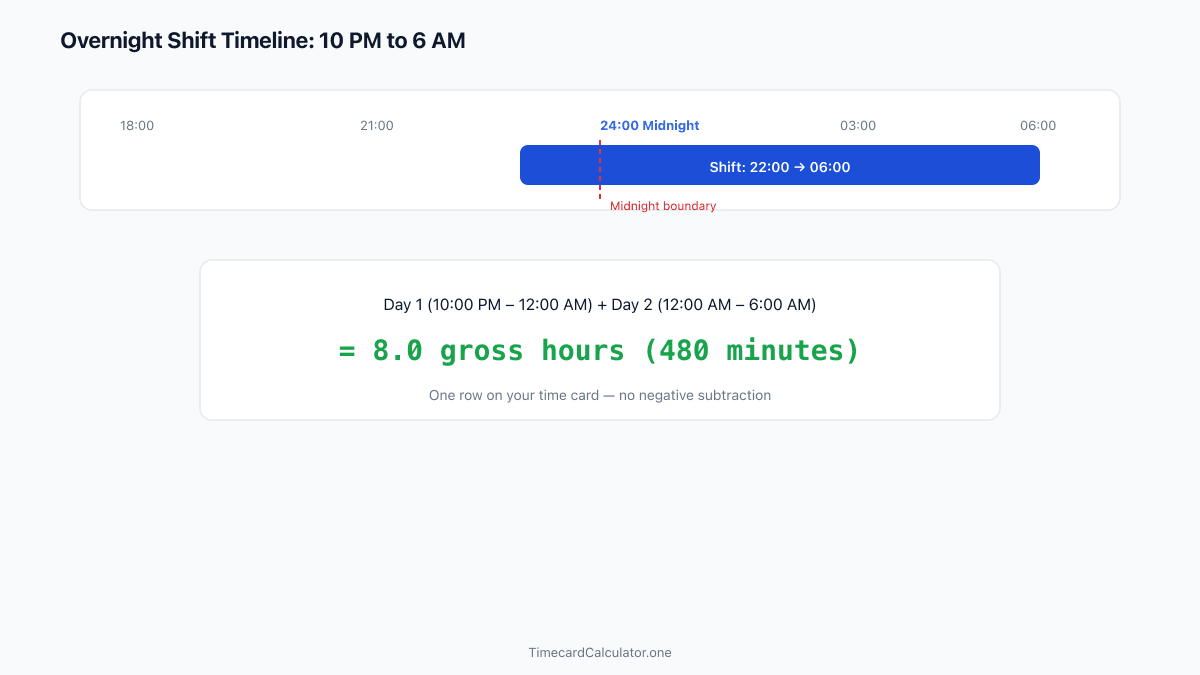
Why overnight shifts break manual math
On a standard same-day shift—9:00 AM to 5:00 PM—you subtract start from end and get eight hours. Overnight shifts span two calendar dates. If you subtract 10:00 PM from 6:00 AM literally, you get a negative number. That leads many workers to guess, round, or short-change themselves by an entire night.

Spreadsheets fail the same way when clock-out is typed as an earlier number than clock-in. Unless the sheet adds twenty-four hours automatically, your night shift looks like zero or negative hours. An overnight shift hours calculator exists to remove that guesswork—you enter both times on one row and the tool detects that the shift crossed midnight.
Accurate night-shift totals matter for weekly overtime too. Under-reporting one eight-hour night can drop you below the forty-hour threshold—or hide hours that should count toward OT. Getting cross-midnight math right on your time card before payroll is non-negotiable.
The formula when a shift crosses midnight
When clock-out is earlier on the clock face than clock-in, add twenty-four hours (1,440 minutes) to the end time before subtracting. In plain terms:
Gross minutes = clock-out − clock-in (if negative, add 1,440 minutes)

Example: in at 10:00 PM (22:00), out at 6:00 AM (06:00). Raw subtraction gives a negative value. Add 1,440 minutes so the gross shift is 480 minutes—eight hours. Our calculator's cross-midnight logic applies this rule whenever clock-out minutes are less than or equal to clock-in minutes—no separate date field required on your part.
You do not need a separate "next day" row unless your employer requires splitting hours across calendar dates for accounting. For net paid hours on a time card, one row with in/out times is enough when the tool handles the midnight boundary.
Double-check AM/PM when typing night hours. Entering 6:00 PM instead of 6:00 AM on clock-out is a common typo that halves your shift on paper. A time card calculator still depends on correct input—compare the net paid total against your badge or schedule before you submit.
Subtract breaks on overnight shifts
Breaks deduct from gross shift length before net paid hours are calculated. Using the same overnight example—10:00 PM to 6:00 AM with a thirty-minute lunch break:
- Gross shift: 8.0 hours (480 minutes)
- Lunch break: 0.5 hours (30 minutes)
- Net paid: 7.5 hours

That matches the overnight example on our work hours calculator and homepage time card. Enter break minutes in the day row or open Advanced Options and enable Default lunch break to apply the same lunch length to every working day—or run the shift through our break time calculator first. The calculator subtracts breaks after gross duration is computed, including for cross-midnight shifts.
Never subtract break time twice—once on the row and again in a manual weekly total. Let the tool sum net paid minutes per day into your weekly or pay-period total.
Overnight hours and weekly overtime
Night-shift hours count toward the same weekly totals as day shifts unless your employer uses a separate night differential (a premium pay rate—not the same as overtime). Our calculator estimates overtime based on hours above a threshold per 7-day workweek block, not based on shift start time. Logging hours on a time card calculator keeps night and day shifts in one weekly total so you can see whether you are approaching the OT threshold.

If you work multiple overnight shifts in one week, each shift's net paid hours roll into the period sum. Enable Advanced Options to see when estimated OT kicks in—default threshold is forty hours per workweek with a 1.5× multiplier. State daily overtime rules (such as California's over-eight-hours-per-day standard) are not modeled automatically; confirm with payroll.
For bi-weekly or custom pay periods, overtime is evaluated in consecutive 7-day blocks from your period start date—not as one combined total for the entire range. That detail matters when night shifts cluster near a workweek boundary.
Use a time card calculator for cross-midnight entry
Instead of maintaining a mental formula, enter clock-in and clock-out in our work hours calculator or on the same day row in the free online time card calculator. Toggle AM/PM or 24-hour format to match your workplace. The summary shows colon and decimal formats side by side so you can verify the shift total before submitting.

You can print the summary for your supervisor or export CSV for payroll with decimal paid hours already calculated. No manual +24 hour step required.
If you also need help with the rest of your card—pay period dates, break policies, or pre-submission review—start with our guide on how to fill out a time card before payroll.
Checklist before submitting night-shift hours
- Clock-in and clock-out on one row per shift—not split across days unless HR requires it
- Lunch break minutes entered and less than gross shift length
- Weekly total includes every night shift you worked in the period
- Period start date aligns with employer workweek for OT blocks
- Calculator summary matches your handwritten draft (if you keep one)
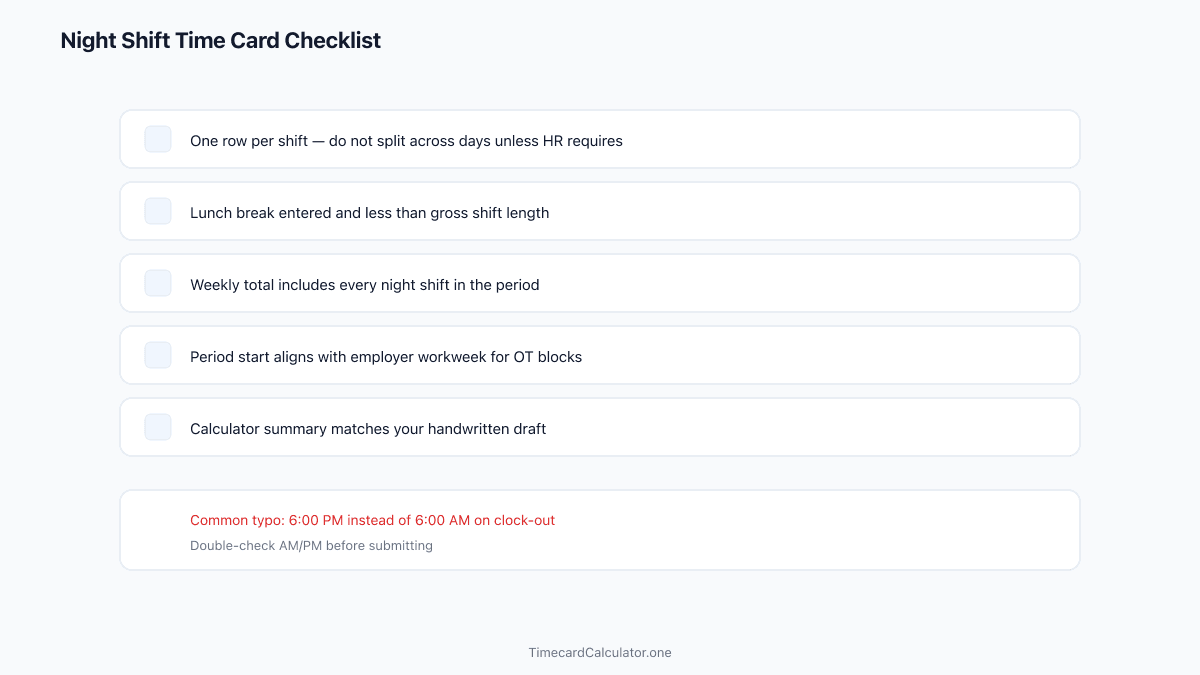
Run the checklist, then submit or export. Catching a cross-midnight error before payroll saves a corrected paycheck cycle.
Need a printable template? Download a free employee time card or biweekly timesheet in PDF or Excel.
Download PDFLog overnight shifts without manual date fixes
Our work hours calculator detects cross-midnight shifts automatically. Enter 10 PM to 6 AM and get accurate net paid hours in seconds.
FAQ
What if I work two overnight shifts in a row?
Log each shift on its own row with its clock-in and clock-out times. The calculator totals net paid hours per day and sums them for the period.
Should I use 24-hour time for overnight shifts?
Either AM/PM or 24-hour entry works. Pick the format your employer prefers; the calculator converts internally for accurate math.
Is a time card calculator more accurate than mental math?
For cross-midnight shifts, yes—because clock-out can appear earlier than clock-in. Automatic +24 hour adjustment prevents under-reporting.
Estimate only. Not tax, legal, or payroll advice. Overtime rules, break policies, and rounding vary by employer, state, and country. Confirm totals with your payroll department before submitting a timesheet.
Related guides
 Free Guide6 min read
How to Fill Out a Time Card Before Submitting to Payroll
A step-by-step guide to recording clock times, deducting breaks, and double-checking totals before you hand your time card to payroll.
 Free Guide6 min read
Convert Clock Time to Decimal Hours for Payroll (Chart + Formula)
Why payroll wants 7.75 instead of 7:45, the divide-by-60 formula, and how to avoid the most common conversion error on your time card.
 Free Guide6 min read
Time Card Overtime Calculator: Weekly OT Thresholds Explained
Why bi-weekly OT is not total hours minus 80, how to set threshold and multiplier, and how to align your workweek start with payroll.